APC UPS Blog - ExcessUPS.com

  • Blog
  • Guides
  • Technical
  • Tips
  • Rants

Backup Power for Aquarium Lights, Pumps, and Heaters

APC Battery Backups can provide back up power to aquarium equipment such as lights, pumps and heaters. Before picking the perfect UPS you need to make a list of everything that needs to be backed up.

Power protection for Fish Tank

For example:


1. 1x Light (30W)
2. 1x Pump (100W)
3. 1x Heater (20W)


Write down the power consumption on each one of these devices. Usually you’ll be able to find that information on the transformer that plugs in to the wall, the manual or even online on the manufacturer’s website. Once you know how much “load” you have, you need to think of how much run time you’ll need.

When you look at battery backup options you’ll see the maximum capacity and how much run time you’ll have at half load, and full load. You’ll be able to get an idea of how much time you’ll have with that UPS should the power fail.

An even easier way to get the perfect power backup for your tank is to make a list of the equipment and give us a call at toll free 866-311-1945 or send us and email  at sales@excessups.com. We will work with you to make sure you get the perfect battery backup for your aquarium. We’ve done power backup configurations for aquariums that provided run times of 10 minutes to 72 hours! I am sure we can help you get the set up you need.

Filed Under: Guides Tagged With: aquarium, battery backup, fish tank, power backup, protection

Battery Backup for the Mac Pro 8-Core & Mac Pro 12-Core

We’ve been getting a lot of emails and calls about a battery backup to protect the Mac Pro 8-Core and the Mac Pro 12-Core. People have been getting confused by the power consumption specifications provided by Apple. Can it really consume that much? Do I really need to have a massive UPS? Do I need to run a circuit just for the Mac? All great questions. After all, if you bought that awesome machine you want to protect your investment from harm. I’m going to demystify the subject.

Battery Backup for Mac Pro


Here are the power specs for the Mac Pro 8-Core and the Mac Pro 12-Core


Line voltage: 100-120V AC or 200-240V AC (wide-range power supply input voltage)

  • Frequency: 50Hz to 60Hz single phase
  • Current: Maximum of 12A (low-voltage range) or 5A (high-voltage range)


The Mac Pro 8-12 Core can use a maximum of 12A; this is the maximum, with it being fully loaded and about to pop! In actuality, the Mac Pro consumes a lot less power during normal operations. We’ve tested several, and we were pleasantly surprised by how efficient they were.

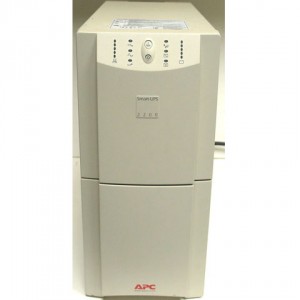
The best UPS for the Mac Pro 8-Core and the Mac Pro 12-Core is the APC Smart-UPS 1500, model  SUA1500. This is a UPS that outputs a sine wave (always preferred by the Mac Pro), regulates the power, has great surge protection, and will provide you more than 15 minutes of run time. We’ve even tested it with a few external hard drives plugged in and a cable modem/router. This UPS plugs in to a regular household 15A outlet, so you don’t need to run any kind of electrical wiring.

APC Smart-UPS 1500

While operating, the Mac Pro 8-Core and the Mac Pro 12-Core consumed less than 30% of the capacity on the UPS, allowing for additional accessories to be plugged in and protected. If you’re doing heavy duty operations, you’ll consume more power, but it won’t overload the UPS — it can take it. You can also safely plug in your cable modem, router, and external hard drive.

As you attach the devices, you’ll see the load meter on the left side of the UPS light up. There are a total of 5 lights; with the equipment described here you’ll be under three. It’s a good idea to run the UPS with less than 4 bars of load, since that will ensure the UPS components don’t overheat and you have adequate run time to safely shut down in case of a power outage.

The refurbished Smart-UPS 1500 is the best value and protection for this  set up. The UPS comes with a one year full replacement warranty so your purchase is protected. If you really want to splurge, buy yourself a brand new SMT1500, the newest generation of the Smart-UPS 1500. Same features, just newer!

Save yourself the headache and don’t buy a cheap $30 Back-UPS for the Mac Pro.  That UPS will do a good job on a small PC or a cash register, but it won’t offer any protection for your Mac Pro.  You’ll end up buying it, trying it and then have to go back to the store to return it.

Shocked Money

If you have any questions about this UPS or need help deciding on a UPS for your particular configuration, get in touch anytime at 866-311-1945 or email at sales@excessups.com, we’re always eager to help.

Filed Under: Tips Tagged With: battery backup, Mac Pro, Mac Pro 12, Mac Pro 8, power protection

APC PowerChute for Mac

Do I need to install PowerChute for Mac to setup and monitor my APC UPS?
We recommend using  the native Mac software  (Energy Saver) to monitor and control the UPS. When you attach USB cable to your Mac, the Mac will auto recognize the UPS and will provide settings in the energy saver pane.

* Tip – If you’ve attached your USB cable but the Mac didn’t recognize the device, try switching USB cables, you’d be amazed at how many times we’ve seen bad USB cables cause all sorts of headaches. If that doesn’t work, try and switch USB ports.

Filed Under: Tips Tagged With: battery backup, mac, power backup

What is an Uninterruptible Power Supply?

Join us as we discuss the basics of power back ups over the next few posts.  We’re going to keep these posts short and simple.  Please leave questions in the comments.

What is an Uninterruptible Power Supply?


uninterruptible power supply

An uninterruptible power supply, also known as a UPS, battery backup or power back up is a device that provides power to attached equipment when the utility power goes out. The main idea of a UPS is to provide instant power without interruption to the attached devices. That way, the computer or server attached will not lose power but will continue running uninterrupted.

Common Names for Uninterruptible Power Supplies:

–          Uninterruptible Power Supply

–          Uninterrupted Power Supply

–          Battery Backup

–          Power Backup

–          UPS Backup

–          UPS

All of the above terminology basically means the same thing. So if you want be part of the cool club, call it a “UPS”.  How do you pronounce that? That’s a great question, it’s pronounced like the shipping company, “UPS”.  It’s not pronounced like the “UPS” in the diapers “Pull Ups”.

What are Uninterruptible Power Supplies used for?

–          Computers

–          Servers

–          Data centers

–          Telecom equipment (voip, pbx, phone system)

–          Medical Equipment

–          POS Equipment (cash registers, debit machines)

–          ATM, ABM

and every other piece of equipment that can be harmed or cause harm by suddenly losing power. You might not have noticed them before, but they’re pretty much everywhere. Your local bank has them, the grocery store and your internet service provider.

In the next few posts, we are going to discuss:

  • Different types of UPSs
  • Main Features
  • Power Problems

If you have any questions please post them in the comments or post them up on our Q&A Site

Filed Under: Guides Tagged With: battery backup, power backup, uninterrupted power supply, uninterruptible power supply, ups